QC was a post-mortem. Now it runs live.
MD QC scores every system-suitability run minutes after the raw file lands on the instrument PC, against a gold standard your team sets. Drift shows up on the day it starts, not when someone finally opens the folder.
Open-source agent (Apache 2.0). Thermo · Sciex · Bruker · Agilent. Included at no charge with every Evosep Lupo and Evokit.
Throughput went up. How often anyone looks at QC didn’t.
A weekly look at the QC was fine at 30 runs a day. At 200 and more, the same three days of unnoticed drift cost seven times the samples. Nobody can watch every QC injection. Something has to, on rules you set.
One product, in two places.
A small agent on the instrument PC does the measuring. The Mass Dynamics platform does the remembering: trends over months, across instruments and sites, shared with the people who need to see them.
The MD QC Agent
A background service that watches your acquisition folder, waits until each raw file is fully written, and classifies it by filename: system-suitability control, process control, gold-standard run, blank or sample.
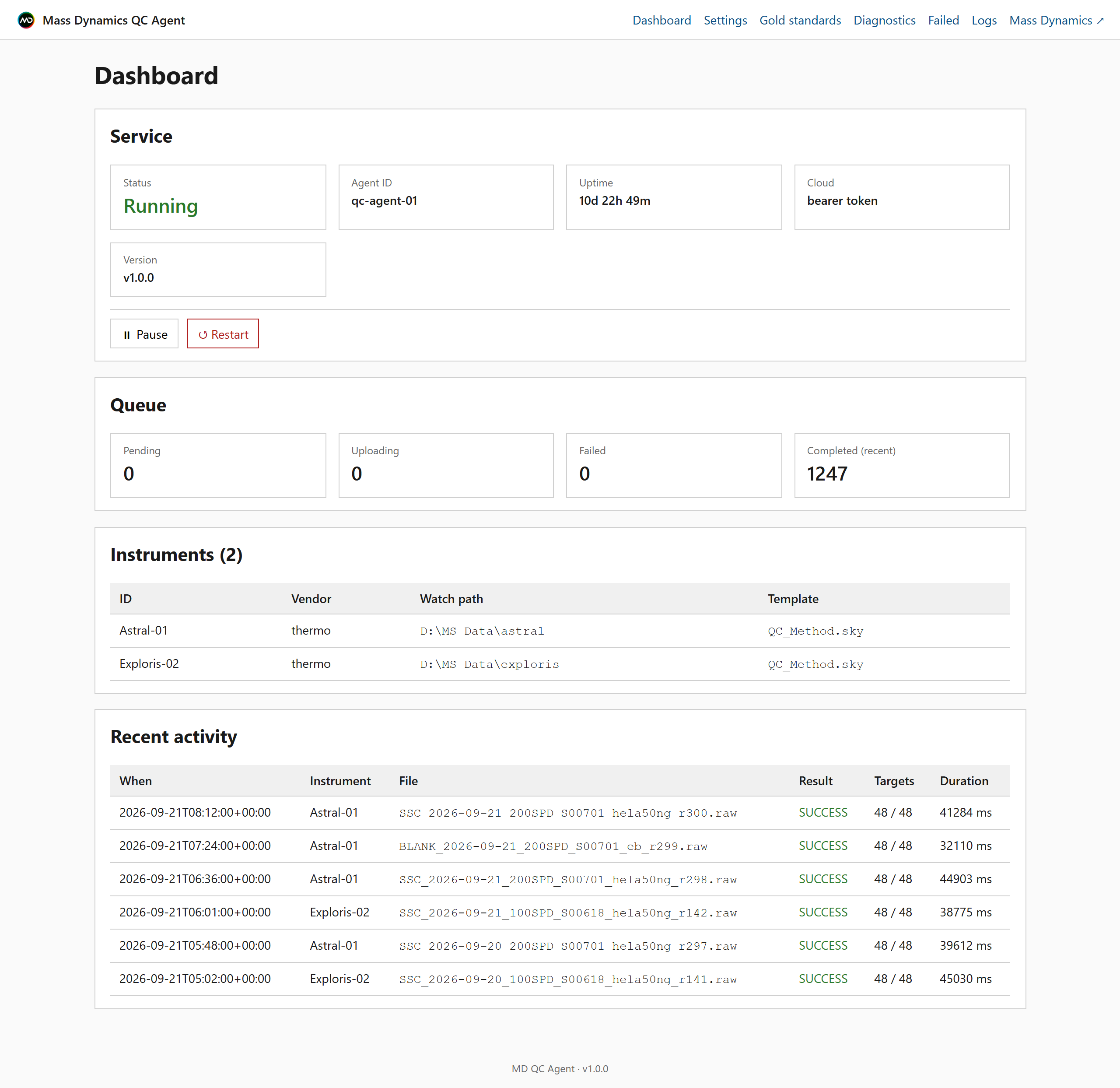
For every control it runs a real Skyline extraction against your own template, scores the run and writes one small JSON payload. Sample files are never touched.
A gold standard you set
At install, or after a source clean or column change, you run 15–20 system-suitability injections per SPD and tick the ones that define the instrument at its best. Their median becomes the gold standard.
Every later run is scored as drift from that known-good state. Old gold standards are kept, dated and labeled, and every payload carries the ID of the one it was scored against.
The MD QC modules
With upload turned on, each payload lands in your Mass Dynamics workspace: a traffic-light scorecard per run, longitudinal tracking per peptide, and the same view for every instrument and site you connect.
QC runs sit next to your experiments, so instrument health is part of the same record as the biology it produced.
From raw file to verdict, every time a control lands.
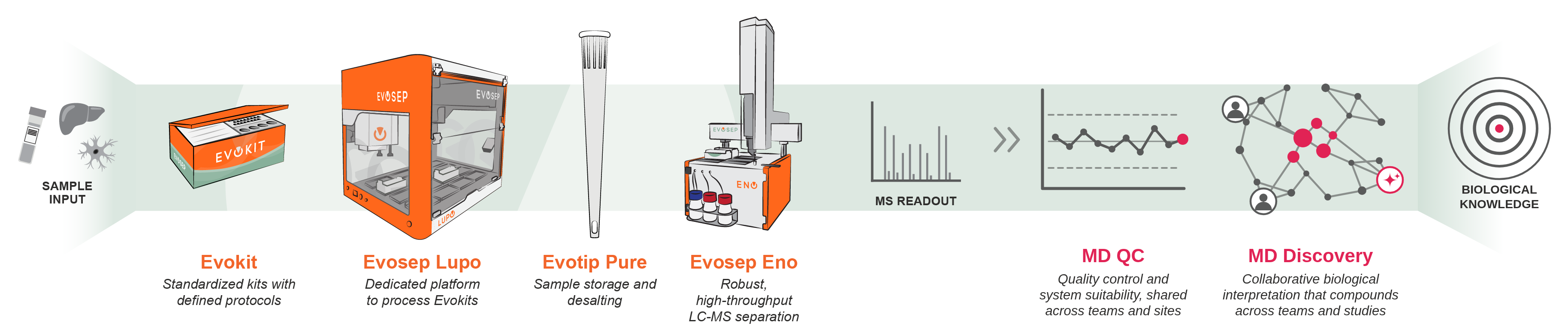
No new method and nothing new in the acquisition path. The agent sits where the Evosep workflow ends: a raw file on the instrument PC.
Watch the folder
Any folder that receives raw files. Thermo, Sciex, Bruker and Agilent.
Wait for the file
Until it has stopped changing and the vendor lock is released, so a half-written file is never read.
Classify
By filename: SSC, PC, SSC-gold, blank or sample, with the samples-per-day alongside. Patterns are configurable.
Run SkylineCmd
Skyline’s own command line against your template, each run in its own isolated folder.
Parse the report
Retention time, peak area, mass error and dot products per peptide, from the report definition you choose.
Check the peak is real
RT within 2% of the gold standard means the right peak. If RT moved, area and dot product decide whether it is drift or a mis-pick.
Score and write JSON
Per-peptide ratios and deviations against the gold standard, with the thresholds applied, in one payload per run.
Show and share
In the agent’s web UI on the PC, and in your Mass Dynamics workspace if upload is on.
Every derived flag ships with the measurements and thresholds that produced it, so a verdict can be replayed, audited or re-derived under your own policy.
Evosep puts the QC in the plate. MD QC reads it.
Every Evokit ships with its controls built in and a fixed run order, so nobody has to design a QC strategy. Evosep standardizes what goes into the instrument. MD QC reads what comes out.
- SSCSystem suitability controls check LC-MS performance over time. The first four injections of each plate are QC, so an experiment can fail fast; the rest are spread through the plate. MD QC scores each one as drift from the gold standard.
- PCProcess controls check the whole sample-preparation workflow. In filenames they arrive as PCD96 or PCD384: one control, the number only records the kit size. MD QC tracks them as a ratio to the gold standard.
- SSC-goldThe 15–20 runs per SPD, chosen at install, that define the gold standard every later control is read against.
Six steps on the instrument PC. About 20–30 minutes.
This is the short version of the operator guide. The site-prep checklist lists what to have ready, and the full guide covers configuration, troubleshooting and file locations.
Create your Mass Dynamics account Free · in the browser
The agent works as a local QC monitor on its own. Trends across months, instruments and sites need a workspace to land in, and the API token the agent uses comes from your account settings.
Install the agent Setup program · no Python needed
Download MDQC-Setup-<version>.exe from the latest release, copy it to the instrument PC (a USB stick is fine) and double-click it. It needs no Python, PowerShell, internet or admin rights. It installs the agent, starts it with a tray icon, opens the dashboard, and starts it again at every login.
If Windows shows “Windows protected your PC”, choose More info › Run anyway; the setup program isn’t code-signed yet. Then check that Start menu › Mass Dynamics QC › MD QC Diagnostics shows Skyline as found. Prefer PowerShell, or rolling out through IT? The guide has the install script and silent-install options.
Set up your instrument Setup wizard
On a new install the dashboard opens a short wizard for your first instrument: the vendor, an instrument ID of your choosing, and the folder it writes raw files to. Add any others under Settings.
A 48-peptide HeLa QC method and its report ship with the agent, so there’s nothing to copy in. Using a different QC panel? Put your .sky file and any libraries it uses in C:\ProgramData\MassDynamics\QC\methods\ and pick it under Settings.
Connect the platform Settings › Cloud
Under Settings › Cloud, choose Production, paste the API token from your account details and save. Without one the agent runs as a local QC monitor and uploads nothing.
Name your QC runs so the agent can tell them from samples: PCD96 or PCD384, SSC, SSCBASE for gold-standard runs, or BLANK, for example SSCBASE_200SPD_S00618_r01.raw. Everything else is treated as a sample and left alone.
Record a gold standard 15–20 runs per SPD
Run your SSCBASE set, open Gold standards in the dashboard, tick the runs that look representative and save. The page shades any run or peptide that deviates from the ticked set, so an equilibration outlier is visible before you commit. Until a baseline is saved, runs are processed but held on the PC, with a red banner saying so; saving scores them and releases them to the platform.
Verify end to end About 90 seconds
Copy one raw file into the watched folder. After the stability window and the Skyline extraction, the dashboard shows the file, the targets found (for example 48/48), the mass error, and a new row on the scorecard. If targets read 0/48, the Skyline template does not match the acquisition; the troubleshooting table in the guide covers it.
Two ways to start.
Set it up yourself from the steps above, or tell us about your lab and the relevant people at Mass Dynamics and Evosep will help you get it running.
Create a free account, install the agent, record a gold standard. Setup is 20–30 minutes; the first verdict comes as soon as a gold standard is saved.
Create your account - freeThe default warn and fail bands are a vendor draft from one dilution series. If you want them set properly on your platform, run the SSC dilution series with us.
Book a working session →Questions on an install: engineering@massdynamics.com, or open an issue on GitHub.
Running an Evosep system?
Tell us about your lab and your instruments, and we’ll be in touch to get MD QC set up.